How to Create an Effective Sales Dashboard for SMEs: Best Practices and Tips
.png)
In today's fast-paced business environment, small and medium enterprises (SMEs) face intense competition. A well-designed sales dashboard can be a game-changer, providing real-time insights into performance metrics and helping sellers make data-driven decisions. Whether you're tracking revenue growth, monitoring customer conversions, or analyzing sales pipelines, an effective dashboard streamlines operations and boosts efficiency. This guide explores how to create a good dashboard for sellers in SMEs, drawing from proven strategies to help your business thrive.
Why SMEs Need a Dedicated Sales Dashboard
For SMEs, resources are often limited, making it crucial to maximize every opportunity. A sales dashboard acts as a centralized hub that visualizes key performance indicators (KPIs), allowing sellers to spot trends, identify bottlenecks, and adjust strategies on the fly. Unlike spreadsheets, which can become cluttered and outdated, dashboards offer interactive, at-a-glance views that save time and reduce errors.
Research shows that businesses using data dashboards see improved decision-making and higher productivity. For sellers in SMEs, this means focusing on high-impact activities like closing deals rather than sifting through data. Ultimately, a good dashboard empowers teams to drive revenue growth while keeping operations lean.
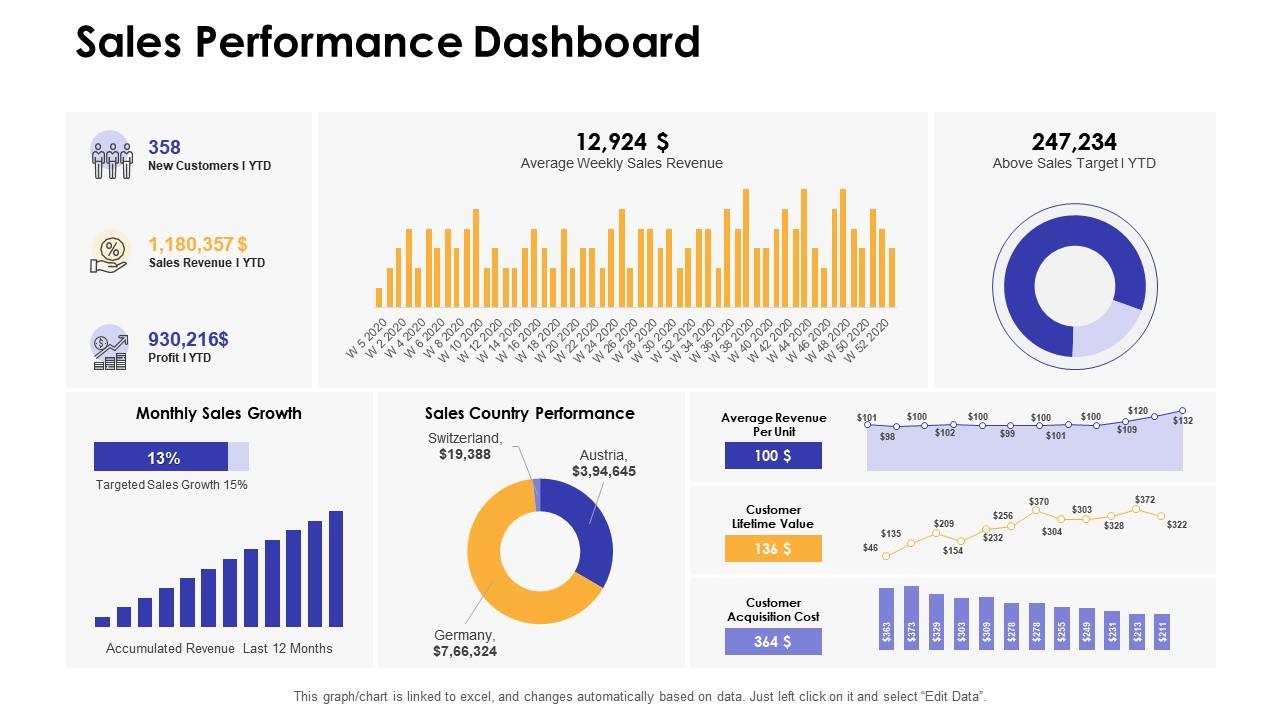 Image source: SlideTeam
Key Features of an Effective Sales Dashboard for SMEs
When building a dashboard, prioritize features that align with your business goals. Here are essential elements based on industry standards:
- Real-Time Data Visualization: Include charts for sales revenue, win rates, and customer acquisition costs. Tools like bar graphs and gauges make complex data easy to understand.
- Customizable KPIs: Track metrics such as year-over-year growth, average deal size, and churn rates. For SMEs, focus on actionable insights like lead conversion rates and pipeline health.
- Integration Capabilities: Ensure the dashboard pulls data from multiple sources, including CRM systems, email platforms, and inventory tools. This holistic view prevents silos and enhances accuracy.
- Mobile Accessibility: Sellers on the go need dashboards that work seamlessly on smartphones and tablets, allowing quick checks during client meetings or travel.
- Alert and Notification Systems: Set up automated alerts for thresholds, like when sales drop below targets, to enable proactive responses.
- User-Friendly Interface: Avoid overwhelming designs; opt for clean layouts with filters for drilling down into specifics, such as regional sales performance.
Pro Tip: These features ensure your dashboard isn't just informative but also intuitive, catering to the dynamic needs of SME sellers.
Step-by-Step Guide: How to Build a Sales Dashboard for Your SME
Creating a dashboard doesn't require advanced technical skills. Follow these steps to get started:
- Identify Your Needs: Start by assessing what metrics matter most. For sellers, this might include tracking outreach efforts like emails sent and calls made, alongside conversion rates. Involve your team to ensure the dashboard addresses real pain points.
- Gather and Organize Data: Locate sources such as sales software, spreadsheets, or e-commerce platforms. Clean the data to eliminate duplicates and inaccuracies for reliable insights.
- Choose the Right Platform: Select user-friendly tools like Tableau, HubSpot, or integrated solutions within an Order Management System (OMS). An OMS can automate data flow, making dashboard setup effortless.
- Design the Layout: Use visual elements like pie charts for sales by region or line graphs for revenue trends. Keep it simple—limit to 5-10 key metrics per view to avoid clutter.
- Test and Iterate: Share prototypes with your team for feedback. Monitor usage and refine based on what's most valuable, such as adding filters for time periods.
- Implement and Train: Roll out the dashboard with training sessions. Encourage regular use to foster a data-driven culture in your SME.
Quick Win: By following these steps, you'll have a functional dashboard up and running in weeks, tailored to your sellers' workflows.
Best Practices for Optimizing Your Sales Dashboard
To maximize impact, incorporate these best practices:
- Focus on Actionable Insights: Prioritize metrics that directly influence decisions, like engagement levels, over vanity stats.
- Ensure Data Security: For SMEs handling sensitive customer info, use platforms with robust encryption and access controls.
- Regular Updates and Reviews: Schedule monthly reviews to update KPIs as your business evolves, such as incorporating new product lines.
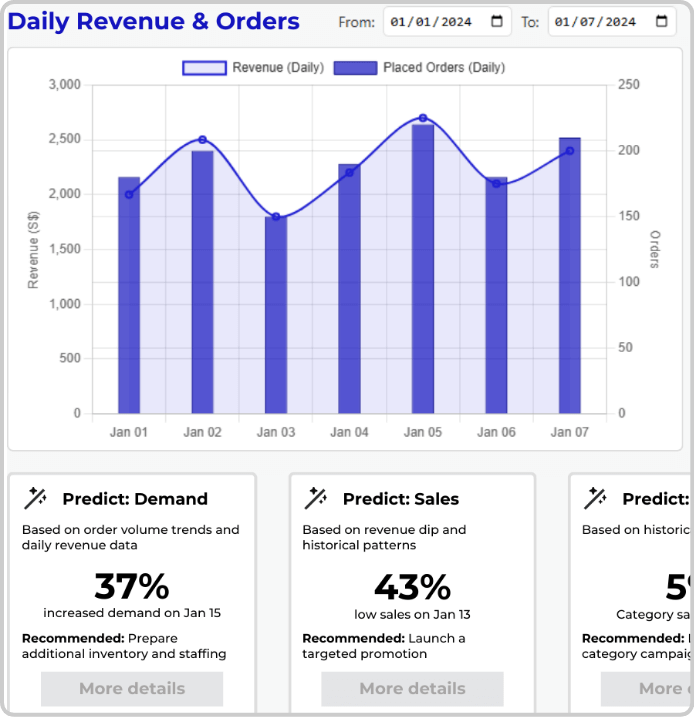
- Incorporate Predictive Analytics: Advanced dashboards can forecast trends, helping sellers anticipate market shifts.
- Align with Business Goals: Tie dashboard metrics to overarching objectives, like increasing upsell volume or reducing churn.
Insight: Adopting these practices turns your dashboard into a strategic asset, driving consistent sales growth.
Tools and Solutions: Leveraging an OMS for Seamless Dashboards
While standalone tools like Google Data Studio or Power BI are great for basic setups, integrating an Order Management System (OMS) takes it to the next level. An OMS centralizes order processing, inventory, and customer data, automatically feeding into customizable dashboards. This eliminates manual data entry, reduces errors, and provides a unified view of your sales ecosystem.
For SMEs, an OMS solution can transform chaotic operations into streamlined processes. Imagine real-time visibility into stock levels, order fulfillment rates, and sales performance—all in one dashboard. This not only saves time but also uncovers opportunities for upselling and customer retention, directly boosting your bottom line.
Actionable Step: Explore OMS platforms that include built-in analytics. They offer scalable features tailored for growing businesses, ensuring you stay competitive without overwhelming costs.
Examples of Successful Sales Dashboards in SMEs
Numerous SMEs have experienced significant benefits from implementing well-designed dashboards. For example, a retail company utilized a dashboard to monitor product sales by category, resulting in a 20% revenue boost by redirecting efforts toward top-performing items. Similarly, a service-oriented SME leveraged a dashboard to track lead sources, optimizing marketing budgets and enhancing return on investment (ROI).
Ready-to-use templates from various platforms offer customizable foundations tailored to your specific requirements. These real-world cases demonstrate how strategic dashboard use can drive measurable growth when applied with care.
Creating an effective sales dashboard goes beyond data collection—it’s about securing a competitive advantage. By emphasizing essential features, following a clear step-by-step process, and adopting best practices, you can develop a tool that fosters informed decision-making and accelerates business growth.
Enhance this process with an OMS solution that simplifies data aggregation and delivers powerful visualizations, as shown in the Daily Revenue & Orders chart. Ready to optimize your sales operations and boost efficiency? Visit SellnShip.io today to explore how our tailored OMS can transform your business and drive success!